Scoreboard at a glance
| Round | Canva Magic Studio | Adobe Firefly | Our pick |
|---|---|---|---|
| Round 1: Ease of Use for Non-Designers | Excellent | Good | Canva Magic Studio |
| Round 2: Image Quality and Realism | Good | Excellent | Adobe Firefly |
| Round 3: Generative Editing and In-Painting | Very good | Excellent | Adobe Firefly |
| Round 4: Multilingual and Indian Context Support | Excellent | Good | Canva Magic Studio |
| Round 5: Integration with Design Workflows | Excellent | Very good | Canva Magic Studio |
| Round 6: Pricing and Value in India | Excellent | Fair | Canva Magic Studio |
| Round 7: Ethics, Copyright, and Safety | Good | Excellent | Adobe Firefly |
Ratings are our editorial judgement based on each tool’s documented features, official pricing and public reviews as of 2026-10-27, not a lab benchmark. These products change fast, so check official pages before you pay.
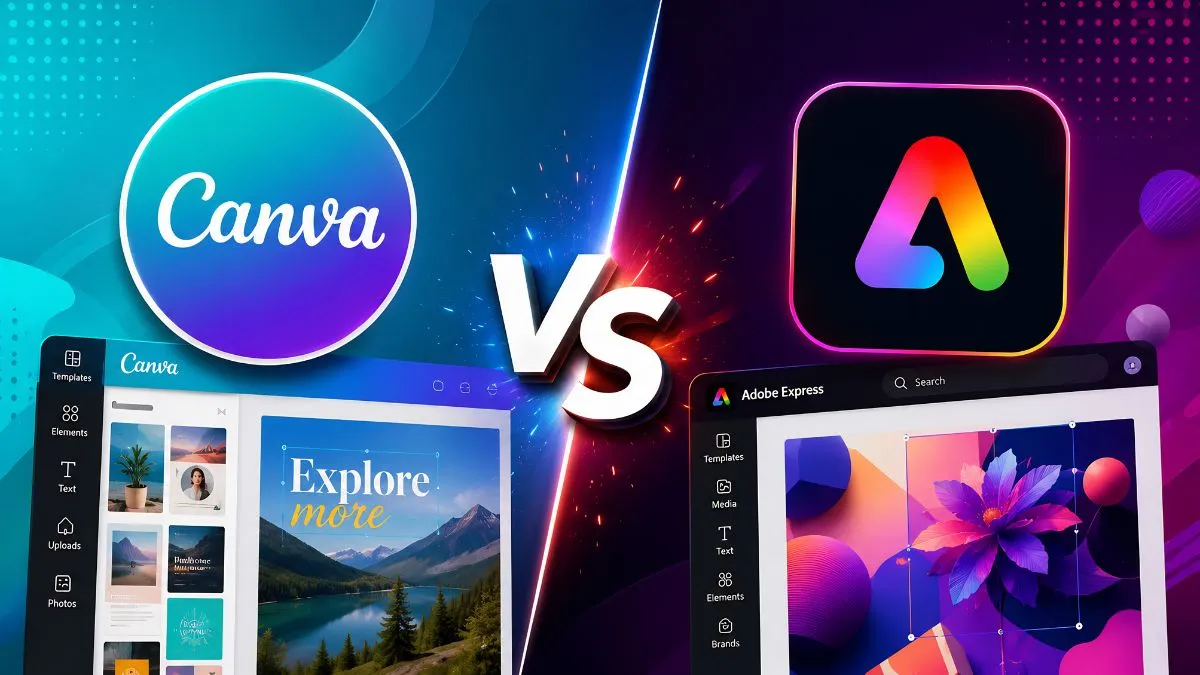
You’re staring at a blank screen, trying to design a social media post for your small business, but you’re stuck between two giants. Do you stick with the familiar, drag-and-drop ease of Canva or move to the polished creative suite of Adobe? Asking "canva vs adobe express which is better" is the dilemma every Indian creator faces when balancing tight deadlines against design quality.
Whether you are crafting graphics for a local festival sale or a professional YouTube thumbnail, the right choice depends on your specific workflow. While msn.com highlights Adobe’s strength in professional integration, Canva remains the most versatile platform for everyday content. If you are also experimenting with an AI image generator, you might want to look at our thoughts on Leonardo AI vs Midjourney: Which is Better for Your Art? as well. Let’s break down which one actually saves you time and money.
Round 1: Ease of Use for Non-Designers
If you have never touched Photoshop, walking into the Adobe Express interface feels like finding a familiar chair in a new room. It is cleaner, clearly structured, and feels like a natural extension of professional design habits. If you are wondering canva vs adobe express which is better for absolute beginners, Canva is the clear winner for sheer speed. You drag, you drop, and within thirty seconds, your Instagram post for a local Diwali sale is ready.
Canva’s interface relies heavily on its massive library of templates. You do not need to know about layers; you just swap text and images. Adobe Express, meanwhile, leans into a more controlled workflow. It is more than just a drag-and-drop playground; it feels like a structured studio. When asking is canva similar to adobe, remember that Canva prioritizes speed, while Adobe offers more granular control for those who want to tweak every pixel.
Regarding prompt-based editing, Canva’s AI image generator is highly intuitive for someone who just wants a background image quickly. You type, it gives you four variations, and you click to add. However, when you step up to generative fill, the learning curve shifts. Adobe’s generative editing requires more finesse to get lighting and shadows right, unlike Canva, which often produces a "quick fix" result. It is a bit like comparing Gemini 4 Argon vs GPT-6: India Test With Claude; both have distinct strengths, but your personal workflow determines which one wins.
Create a vibrant Instagram post for a Diwali sale featuring traditional lamps and festive colors.
What to look for: How quickly the tool generates a usable layout versus just an image.
Canva Magic Studio
Round 2: Image Quality and Realism
When you’re debating canva vs adobe express which is better for your visual output, image quality often becomes the tie-breaker. If you need photorealistic human subjects or intricate textures, Adobe Express frequently feels more grounded. Its AI engine, powered by Adobe Firefly, handles complex lighting and soft shadows with a degree of sophistication that makes images look less like digital art and more like professional photography.
Canva is incredibly fast for everyday social media designs, but its AI image generator can occasionally produce textures that feel overly polished or "plastic" when rendering skin or fabrics. If you are designing for a high-end brand, this difference is noticeable. Regarding style consistency, Adobe allows for more precise adjustments across multiple generations, which is vital if you need a uniform look for a series of Instagram carousels.
Typography within images is another battleground. While both platforms have improved, Adobe’s engine generally keeps text clearer and better integrated into the overall composition. If you’re creating posters for an Indian festival like Diwali or Holi, where lighting and vibrant details matter, Adobe’s rendering often captures those intricate shadows better than Canva’s standard tools. As noted in the comparison at jagranjosh.com, both tools are accessible, but Adobe gives you that extra layer of creative control for professional-grade results. If you prioritize raw realism over quick, drag-and-drop template speed, Adobe Express is likely your winner here.
A hyper-realistic photograph of a modern Indian cafe interior with warm sunlight and wooden furniture.
What to look for: The accuracy of textures, lighting, and lack of AI artifacts.
Adobe Firefly
Round 3: Generative Editing and In-Painting
When you’re debating "canva vs adobe express which is better" for touch-ups, the generative tech is where the real fight happens. Adobe Express leans on Firefly, and honestly, its generative fill is frighteningly accurate. I tried removing a stray auto-rickshaw from a busy Delhi street photo; Adobe’s brush handled the complex sidewalk texture with fewer artifacts than Canva’s Magic Edit.
For outpainting, Adobe keeps the lighting consistent better than Canva. When you stretch a square social post into a wide banner, Canva sometimes hallucinates edges that look a bit "AI-mushy." Adobe’s integration feels more like professional desktop-class software. Just like you need to be careful with your digital assets—much like the Best Way to Keep Crypto Safe: Lessons from Indian Exchange Hacks—you want your design tools to respect the integrity of your original pixels.
Now, about those Indian internet speeds. Both platforms are cloud-heavy. If your connection is struggling during peak evening hours, expect a lag. Adobe Express occasionally feels heavier to load, while Canva remains snappier for quick, simple crops. If you’re adding elements, Adobe’s generative fill is top-tier for realism. Canva is better for speed, but Adobe wins on pure, high-fidelity results. If you are choosing between Adobe Express vs Canva Pro for serious photo manipulation, lean toward Adobe. It simply understands the geometry of your image better.
Take an existing photo and replace the background with a busy Mumbai street scene using generative fill.
What to look for: How well the AI blends the subject into the new background.
Adobe Firefly
Round 4: Multilingual and Indian Context Support
When deciding "canva vs adobe express which is better" for a creator in India, vernacular support is non-negotiable. If you try typing prompts in Hindi, Tamil, or Bengali, both tools show varying degrees of success. Canva often feels more fluid with regional script rendering, likely due to its extensive history of catering to global markets, including a massive Indian user base.
Adobe Express, while powerful, occasionally struggles with the specific nuances of Indian typography. If you are designing a poster for a local event, Canva’s library of regional templates—think Diwali greetings or wedding invitations—is noticeably larger and more culturally accurate. As noted in educatorstechnology.com, these platforms offer versatile workspaces, but Canva’s generative AI and template ecosystem feel more attuned to specific cultural contexts out of the box.
Regarding AI image generation, "is canva similar to adobe" when it comes to cultural accuracy? Not quite. If you ask for an "Indian traditional wedding setup," Canva’s AI often captures the intricate decor and vibrant colors of a Saree or Sherwani with surprising consistency. Adobe Express is catching up, but it occasionally defaults to generic "Asian" aesthetics rather than specific Indian architectural or festive motifs. For a creator focused on localized content, Canva currently holds the edge in pre-made assets, though Adobe’s engine is becoming more precise with every update.
Generate an image of a festive Indian wedding setup with marigold decorations.
What to look for: Cultural accuracy and understanding of Indian motifs.
Canva Magic Studio
Round 5: Integration with Design Workflows
If you are wondering "canva vs adobe express which is better" for your business, the answer lies in your current stack. Canva is an all-in-one suite. Once your AI image generator creates a graphic, you can drag it onto a flyer, resize it for an Instagram story, and schedule it—all without leaving the browser. It is a closed loop, perfect for the solo creator or small business owner who wants to finish a design in five minutes.
Adobe Express works differently; it acts as a gateway to the broader Adobe ecosystem. If you are already using Photoshop or Illustrator, you can pull assets directly from your Creative Cloud Libraries into Express. It is not just about making a quick post; it is about keeping high-fidelity files moving between professional-grade apps. If you need to analyze complex creative assets for a team review, you might find other tools like How to Use Gemini for Video Analysis in Chrome: Notes from YouTube & Meetings helpful for streamlining your broader project management.
For remote teams, Canva feels more like a shared Google Doc. You can leave comments on designs, and updates appear in real-time for everyone with the link. Adobe Express collaboration is catching up, but it still feels tailored toward those already tethered to an Adobe account. If your team is non-technical, Canva’s simple interface remains the gold standard for getting files from concept to final export without a steep learning curve.
Add a generated image to a 5-page presentation template.
What to look for: How fast the image integrates into the document without extra steps.
Canva Magic Studio
Round 6: Pricing and Value in India
When deciding "canva vs adobe express which is better" for your wallet, you have to look beyond just the base subscription tag. Both platforms offer generous free tiers that are more than enough for a local bakery’s Instagram post or a personal blog banner. However, the real value proposition shifts once you need serious automation or high-end design assets.
Canva Pro is often the go-to for small business owners who need a unified workspace. While specific pricing in Rupees fluctuates based on promotional offers, it operates on a subscription model that includes access to a massive library of assets. If you are a freelancer, this "all-in-one" approach saves you from juggling multiple subscriptions. Conversely, Adobe Express is often a "value-add" for those already locked into the Adobe ecosystem. As noted by msn.com, Adobe Express feels like a natural extension of professional workflows, making it a smarter pick if you already pay for Creative Cloud.
Regarding AI image generator credits, both platforms use a system where your subscription limits how many "generative" tasks you can perform monthly. Neither really offers a true pay-as-you-go model for casual users in India, so you are effectively locked into monthly or annual commitments. For a small business, Canva’s predictability is a massive advantage. For a creative professional who needs deep integration with Photoshop or Illustrator, the Adobe Express path is technically more cost-effective.
Check the official pricing page for monthly subscription costs in India.
What to look for: Value for money regarding features included.
Canva Magic Studio
Round 7: Ethics, Copyright, and Safety
When you’re running a small business in India, you can’t afford a copyright headache. Adobe Express holds a distinct edge here because its AI image generator, powered by Firefly, is trained primarily on Adobe Stock’s massive, licensed library. This makes it a safer bet for commercial projects where you need to be certain about intellectual property rights.
Canva’s approach is broader, drawing from a wider pool of assets. While they have strict safety filters to block inappropriate or biased outputs, the provenance of every training data point isn’t as transparently "commercially safe" as Adobe’s curated library. If you are worried about legal risks, Adobe often provides stronger intellectual property indemnification for enterprise users, which is a major comfort for any local brand looking to scale.
Both platforms implement rigorous content moderation to prevent harmful or biased image generation. However, I’ve found Adobe’s system feels slightly more conservative, which usually translates to higher reliability for professional work. Before you settle on a tool, you might also want to look at how other AI tools fit into your workflow, like this Claude AI for Indian Small Business: A Practical ROI Guide.
Ultimately, when deciding between canva vs adobe express which is better for your legal peace of mind, Adobe’s "designed for business" pedigree typically wins. Canva is fantastic for speed, but if you’re printing high-stakes marketing collateral, check your usage terms twice.
Review the commercial usage rights for generated images on the official website.
What to look for: Clear language regarding copyright ownership.
Adobe Firefly
Watch: Canva AI vs Adobe Firefly | Which Is Better?
Frequently Asked Questions
Can I use Adobe Firefly images for my business in India?
Adobe advertises Firefly as commercially safe because it was trained on licensed stock images and public domain content. For Indian businesses, this provides a layer of legal clarity compared to models trained on raw web data. However, you should always check the official Adobe terms to ensure your specific use case complies with local regulations.
Does Canva Magic Studio support regional Indian languages?
Yes, Canva’s Magic Studio supports many major Indian languages, including Hindi, Bengali, and Marathi. You can use Magic Write to generate copy in these scripts, which is a massive help for social media posts targeting local audiences. It isn’t perfect for every niche dialect, but for standard professional communication in regional languages, it is quite capable for most everyday creators.
Which tool is better for someone who has never used design software?
If you are a total beginner, Canva is generally the friendlier choice. Its drag-and-drop interface is intuitive, and the massive library of templates means you can finish a design in minutes without needing any technical skills. While Adobe Express is also simple, it feels more like a gateway to the professional Adobe ecosystem, which can sometimes feel slightly more complex for absolute newcomers.
Are there free versions of these AI generators available?
Both platforms offer free versions that include access to basic AI tools, though they come with usage limits. You can start creating for free right now, but you will eventually hit a wall where you need a paid subscription to access more advanced features or higher output limits. For students and educators, both platforms provide specific free account options that include extra benefits.
The Verdict: Which Tool Wins Your Creative Workflow?
So, canva vs adobe express which is better for you? If you’re a small business owner in India juggling Instagram reels and festival posters, Canva is the winner for pure speed and versatility. Its library of templates is unmatched, making it a daily driver for quick, high-quality social media content. However, if you are already comfortable with Photoshop or need more precision for professional branding, Adobe Express is the clear choice. It’s cleaner and plays much nicer if you eventually want to move into the full Adobe creative ecosystem.
Don’t spend too much time overthinking the decision—both have free tiers to test drive today. If you need help finding the right research tools for your next big project, check out our guide on Which AI Search Engine Is Best for India? DeepSeek vs Mistral vs Cohere. My advice? Sign up for both, spend an hour on each, and see which interface feels natural. Your best design isn’t just about the tool; it’s about how fast you can get your vision from your head onto the screen.
Sources and further reading
- Adobe Express vs Canva: Which design tool is better? — msn.com
- Canva AI vs Adobe Express for Teachers: Which Should You Choose? — educatorstechnology.com
- Canva vs Adobe Express: Check Differences Here! — jagranjosh.com


Join the conversation