
Key takeaways
- Local knowledge bases provide superior context for AI coding tools.
- Structured Markdown is the universal language for AI-developer collaboration.
- Maintaining a ‘Second Brain’ reduces AI hallucination by grounding responses in your own specs.
- Privacy is maintained by keeping your documentation and code in a local, offline-first environment.
Ever spent ten minutes repeating instructions to an AI because it "forgot" the context of your previous session? It is a common frustration, but you can stop the cycle by building a persistent memory layer for your tools. Learning how to connect Claude Code to obsidian effectively transforms your local markdown notes into a reliable second brain for your coding agent.
By mapping your codebase to a structured vault, you provide the context needed to improve accuracy and consistency in your AI coding workflow. According to insights from journaldunet.com, treating your notes as a network of ideas rather than just static files helps your agent make better connections. Much like how professionals organize documentation in How to Use Claude for Legal: A Practical Guide for Small Business, you can structure your technical knowledge to keep your development projects on track. Let’s get your setup ready.
Understanding the Claude Code and Obsidian Synergy
When you rely solely on a cloud-based AI’s native memory, you are often fighting a losing battle against "context window fatigue." The AI forgets early instructions, gets distracted by irrelevant noise, and struggles to maintain a consistent project architecture over weeks of development. This is why learning how to connect Claude Code to obsidian is an essential upgrade for your AI coding workflow.
Obsidian acts as your structured, local markdown repository. Instead of dumping notes into a black-box cloud storage, you keep your project logic, API designs, and architectural decisions in plain text files. Claude Code interacts directly with your local file system, treating your vault like a persistent, searchable brain. When you need to perform complex tasks, like checking site architecture, you can even pair this approach with techniques found in guides like How to Do SEO Audit of a Website with Claude and Semrush MCP.
Maintaining a "Second Brain" offers two clear advantages:
- Context Retention: You avoid repeating instructions. Claude reads your notes directly, ensuring it stays aligned with your specific coding style.
- Privacy: Since your documentation and prompts live offline in your vault, you aren’t sending sensitive architectural blueprints to a cloud server.
By keeping your memory in markdown, you ensure that your AI assistant can always reference the why behind your code, not just the what.
Setting Up Your Local Obsidian Vault
To get started, download and install Obsidian from their official site. Think of your vault as your AI’s external hard drive—a dedicated folder on your machine where every note lives as a simple .md file. As geeky-gadgets.com explains, this structure turns your notes into a searchable network, which is essential when you want to know how to connect Claude Code to obsidian effectively.
Create a clean folder hierarchy to keep things organized for your AI agent:
/Project Specs: High-level requirements and logic flows./Code Snippets: Reusable blocks and function templates./API References: Documentation and endpoint definitions.
Claude Code thrives on predictable formats, so stick to standard Markdown. Every note should start with YAML frontmatter, which is just a block of metadata at the top of your file. Use this structure to help the AI identify file purposes:
“yaml --- type: snippet language: typescript status: verified --- “
This metadata acts as a map, allowing the AI to query your vault with extreme precision. While Obsidian works perfectly out of the box, I recommend enabling the "Backlinks" core plugin to visualize how your ideas connect. For advanced users, community plugins like Dataview can help you generate lists of files based on that YAML metadata, ensuring your AI coding workflow remains crisp. By keeping your vault local, you maintain full control over your data while giving Claude the exact context it needs to minimize errors and accelerate development.
Configuring Claude Code for Local Context
To get Claude Code working with your local files, you need to initialize it directly inside your project directory. Open your terminal, navigate to your root folder, and run the claude command. This creates a local configuration state that bridges your code to the agent’s reasoning engine, allowing you to learn how to use obsidian with claude code effectively.
Before Claude begins, you must focus its attention. Create a .claudecodesignore file to exclude sensitive data, build artifacts, or node_modules. This isn’t just about speed; it is vital for AI Agent Security Best Practices: Preventing Data Leaks. By narrowing the scope, you ensure the AI does not hallucinate based on irrelevant configuration files.
I recommend maintaining a SYSTEM_PROMPT.md file in your root. Claude Code treats this as a source of truth for your coding standards, project goals, and preferred architectural patterns. To connect your Obsidian vault, use the --context flag during startup. For instance:
claude --context ./my-obsidian-vault/project-notes
This forces the agent to index your second brain alongside your source code. Once initiated, verify that the agent recognizes your setup by asking, "What is the primary architectural goal defined in my documentation?" If it pulls the context correctly, you know your setup is working. If the agent struggles, check your file paths; Claude requires paths that it can clearly traverse from the terminal’s active directory.
Structuring Your Knowledge Base for AI Retrieval
To make your vault truly effective, stop treating notes like long-form essays. Instead, focus on "atomic notes"—each file should cover exactly one function or requirement. This simplicity helps the model pinpoint information without wading through clutter.
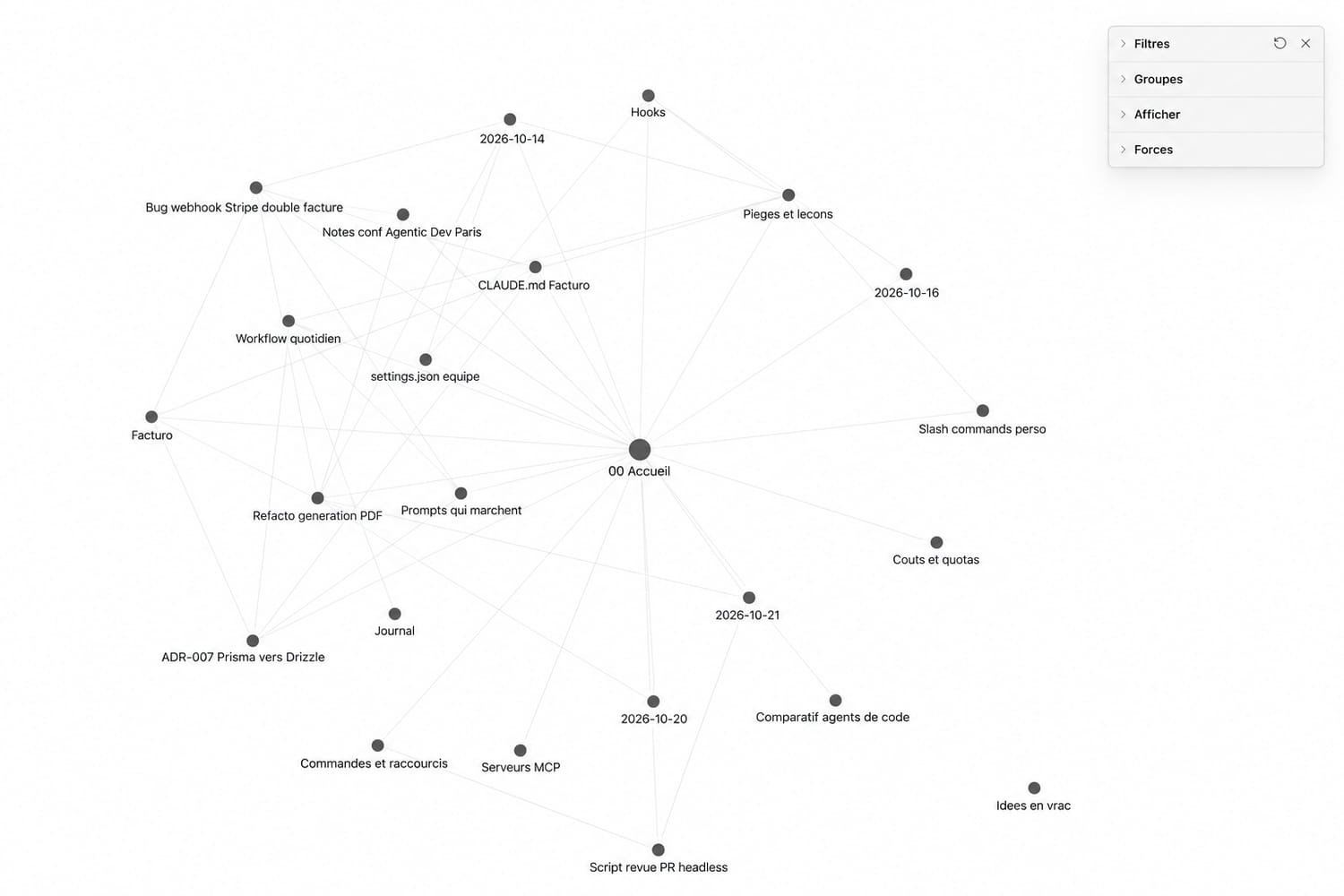
Use Obsidian’s internal linking, the [[ ]] syntax, to map your codebase dependencies. If a user authentication module relies on a database schema, link those two notes. This creates a visual network that Claude Code can follow to understand the logic behind your architecture. When writing code snippets inside these notes, always wrap them in standard markdown triple backticks (“`language) to ensure the model parses them accurately.
You should also create a dedicated System Prompt note. This file acts as a persistent reference for your preferred coding style, specific library versions, and architectural constraints. As mentioned in this note.com breakdown, offloading memory to Obsidian saves the model’s "stamina" for actual logic rather than rote memorization. Finally, maintain a Changelog note. By tracking AI-assisted development cycles here, you provide a clear history of what was changed and why.
By organizing your knowledge this way, you move beyond basic note-taking and build a reliable second brain. It makes the AI coding workflow predictable and keeps your context centralized, letting Claude focus on solving complex problems rather than guessing the state of your project.
Step-by-Step: Linking Code to Notes
To truly master how to connect Claude Code to obsidian, you need to treat your vault as an active participant in your daily development. Follow these five steps to bridge your documentation and your IDE efficiently.
- Sync your environments: Open your active project in VS Code and your documentation vault in Obsidian simultaneously. Having both windows side-by-side allows for rapid context switching and ensures your technical specs are never more than a click away.
- Map your references: Inside your source code, add a comment line containing a URI link to your Obsidian note. Using the format
obsidian://open?vault=YourVault&file=NoteNameallows you to jump directly from your editor to your specific technical requirements without hunting through file folders. - Query your knowledge: Within your Claude Code terminal, ask questions that explicitly reference your vault path. For instance, try asking, "Based on the logic in my Obsidian docs, how should I structure this database schema?"
- Supply context: If the AI feels disconnected, copy the relevant Markdown content from your note directly into the chat. Being explicit with your "second brain" data is far superior to relying on general training.
- Iterate and update: After finalizing your code, revisit the Obsidian note to record the actual implementation outcome. This constant loop keeps your documentation accurate, much like how you might use How to Use Gemini for Video Analysis in Chrome: Notes from YouTube & Meetings to archive complex research insights. Maintaining this feedback loop is the secret to a superior AI coding workflow.
Common Mistakes to Avoid
Even with a sharp setup, it is easy to trip up. First, avoid dumping every single project file into your Obsidian vault. Overloading the AI’s context window with irrelevant documentation forces it to sift through unnecessary noise, which wastes tokens and degrades accuracy. As noted by journaldunet.com, your vault should act as a curated, intentional memory, not a digital junk drawer.
Another common trap is neglecting updates after a major refactor. If you change your codebase but leave your Obsidian notes describing the old architecture, you are inviting AI hallucinations. Claude will naturally try to follow the outdated documentation rather than your current code implementation. Similarly, resist the urge to build a labyrinthine folder structure. If your directory nesting is too deep, you might confuse the AI’s file path navigation. Keep your hierarchy flat to stay safe.
Always prioritize descriptive filenames. A file named notes.md tells the AI nothing; api-endpoint-auth-flow.md provides immediate, useful context. Finally, please keep your security tight. Never store sensitive credentials, private keys, or API secrets inside your documentation notes. It sounds obvious, but when you are in the flow of writing, it is easy to accidentally copy-paste a configuration file containing a secret. If you keep these guardrails in mind, your AI coding workflow will remain both private and incredibly efficient.
The Final Checklist for Success
Before you finalize your setup, run through this quick technical audit to ensure your AI coding workflow remains crisp and accurate.
Configuration Audit
- Standardize Formats: Ensure every document is in plain Markdown (.md). Claude Code thrives on clean syntax; proprietary formatting or rich-text snippets will only create noise for the model.
- Vault Placement: Keep your vault within your project directory for the simplest access. If you need a global knowledge base, use a symbolic link (symlink) to map that folder into your local project.
- Connectivity Test: From your terminal, invoke Claude Code and explicitly reference a note path, such as
@notes/project-architecture.md. If the agent cannot retrieve the content, verify your file permissions and directory structure. - Filter Context: Create a
.claudecodesignorefile to block unnecessary files like the hidden.obsidianconfiguration folder or image caches. This prevents the agent from wasting tokens on UI metadata. - Maintenance Routine: Schedule a weekly "Knowledge Sync." Spend 15 minutes pruning outdated notes. Much like learning How to Continue a GitHub Copilot Session in VS Code, keeping your workspace state clean prevents the model from hallucinating based on deprecated project decisions.
By checking these five points, you transform your Obsidian vault from a simple folder into a reliable engine that powers your coding sessions. If the agent struggles to follow links, ensure your relative file paths are clearly defined within the Markdown body.
Frequently Asked Questions
Does Claude Code automatically update my Obsidian notes?
Claude Code does not automatically update your notes without specific instructions, but it can read, write, and edit your Markdown files directly. Since February 2026, you can use the official command-line interface to allow the agent to query your Obsidian index. You remain in control of the workflow; you must prompt the agent to save specific project insights or code decisions into your vault.
Can I use Obsidian plugins to push code directly to Claude?
As of late 2026, there is no official plugin designed to push code directly to Claude Code. Because Claude Code functions by reading your local file system, the best way to use Obsidian with Claude Code is by keeping your code and your Markdown notes within the same directory structure. This allows the agent to access your documentation as a living context file.
Is it safe to store proprietary logic in a local Obsidian vault?
Yes, your Obsidian vault lives as a standard folder on your local machine, making it a secure place for proprietary logic. Since Claude Code interacts with these files locally on your computer, your data stays within your controlled environment rather than being automatically uploaded to an external cloud server. You maintain full ownership and physical control over every single Markdown file you create.
How does this differ from using a standard GitHub Wiki?
A GitHub Wiki is generally a static documentation repository for your project, whereas Obsidian functions as a dynamic, interconnected network of thoughts. By using the Zettelkasten method, you create logical links between ideas that Claude Code can follow to better understand your project context. This helps the agent make deeper connections in memory, which is significantly more effective than browsing a standard, linear documentation wiki.
Building a Sustainable AI Coding Workflow
Building a reliable AI coding workflow isn’t about chasing the latest shiny tool; it’s about creating a system that actually remembers your specific project preferences. When you figure out how to connect Claude Code to Obsidian, you stop repeating yourself and start building a genuine, searchable repository of your project logic.
If you are ready to organize your workspace, don’t just dump every stray thought into your vault. Start by mapping out one active project. If you are also managing other AI dependencies, you might want to look into How to Migrate Your Custom GPTs Before December 11 to keep your broader setup clean. Your goal is to make your Obsidian vault a living index that feeds context directly into your agent. Start small, verify that Claude Code can read your markdown files, and refine your structure as you go.


Join the conversation